3. Converting To JAR File
info
Before we can containerize our Spring Boot application, we must compile it into an executable JAR file.
Building the JAR
Run the following command in your terminal to cleanly build the project:
mvn clean install
Wait for the process to complete.
Next, package the application while skipping tests to speed up the process:
mvn clean package -DskipTests
Addressing Errors
If you encounter an error like this:
The POM for org.springframework.boot:spring-boot-maven-plugin:jar:3.1.2 is missing, no dependency information available
Fix: Add the correct Maven Plugin configuration to your pom.xml.
<build>
    <plugins>
        <plugin>
            <groupId>org.springframework.boot</groupId>
            <artifactId>spring-boot-maven-plugin</artifactId>
            <version>3.1.2</version>
        </plugin>
    </plugins>
</build>
After updating the pom.xml, run the package command again:
mvn clean package -DskipTests
Verify Build Success
Once successful, you should see a target folder generated in your project directory containing the compiled JAR file.
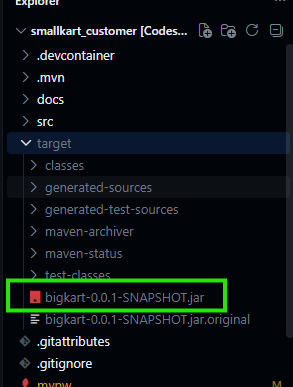
Now proceed to Creating DockerFile.