Remote Collaboration
Collaborating on GitHub using Git remotes typically involves a structured workflow to ensure code quality and avoid conflicts. Whether you are working on a shared repository or contributing via a fork, the process relies on a few core commands and practices.
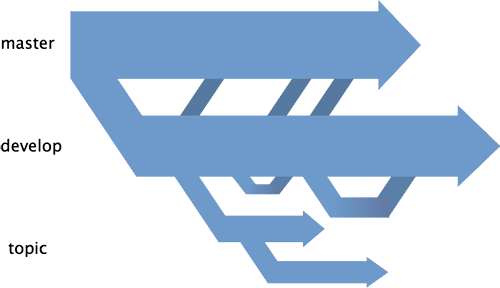
1. Common Collaboration Workflows
There are two primary ways teams typically collaborate:
- Shared Repository Model: The repository owner adds collaborators directly via repository settings. Collaborators have push access to the repository and work on separate branches.
- Forking Workflow: Commonly used in open-source projects. You "fork" (copy) the project to your own account, make changes in your fork, and submit a Pull Request (PR) to the original repository to propose your changes.
2. Standard Daily Workflow
Regardless of the model, following this "GitHub Flow" helps keep your project organized:
- Pull Latest Changes: Always start by ensuring your local branch is up to date to minimize merge conflicts.
git pull origin main
- Create a Feature Branch: Never work directly on the
main(ormaster) branch. Create a new branch for every task or feature.git checkout -b feature/my-new-feature - Make Changes & Commit: Write your code, stage it, and commit.
- Push Your Branch: Send your branch to the remote repository.
git push -u origin feature/my-new-feature
- Open a Pull Request: Go to the repository on GitHub and click "Compare & pull request". This initiates a discussion, code review, and automated testing before the code is merged into the main branch.
Key Concepts & Commands
- Remote (
origin/upstream): A "remote" is a named connection to a repository URL. git remote -v: Lists all your configured remote connections.git remote add <name> <url>: Adds a new remote connection.git fetchvsgit pull:fetchgets changes,pullgets and merges them.